I’m going to be real here: security and privacy are not easy to come by these days. In its truest, purest form, it’s not even possible. It’s a constant uphill battle, and AI brings a whole new level of challenges we are still learning to face, both good and bad. New tools are being developed, new exploits are being figured out, and others are being discovered and patched. There are many levels to be concerned about, but to be Frank, there is so much you can do. Dedicated teams of people with time on their hands are very clever, but, much like securing your home, car, and bicycle, there are many levels of deterrence and hurdles you can put in place. If you’re looking for “state-level” security, you have come to the wrong place. I cannot help you if a government is seriously targeting you – I don’t know how many people could help you, you would need another government backing you. That’s not what I do, but I can help provide best practices and teach you good digital hygiene. I’m really just here to help shape people up and put them in the secure top 1%.
What I Can Do For You
// Private Email Setup
Move off Gmail, Yahoo, Hotmail, AOL mail. They scan your emails for advertising data, and there are tracker vulnerabilities they don’t protect you from (see hidden pixel trackers). You also never know when they will fold or be merged into another provider. Own your e-mail domain forever, independent of any service, and run it through a secure email provider. Should that company go under or prove unreliable, you can easily migrate but maintain the same email. Again, here I must point out that e-mail as it exists today is flawed and should not be considered fully secure. There are just things you can do to tidy it up and mitigate issues. It’s 1970’s technology that was never meant for today’s tech standards. There are simply better messaging systems if encryption is paramount. But do your due diligence, e-mail is still great for many things. I will migrate you to a more secure provider like Proton and handle the DNS setup, migration, and configuration so nothing gets lost.
// Device De-Googling
Remove Google services from Android and perhaps go all the way to a Graphene phone if you want to stay away from both Apple and Google*. I can help you configure iOS for better privacy, and set up search engine alternatives that don’t harvest your data. Kagi is a great place to start. Stop using Google Maps and host your own GPS tracking instead of Google’s Map Timeline. Find a Google Drive alternative. There are a few routes to go depending on your needs (file cloud storage and general cloud office suites). Get off Google Photos, Apple iCloud is a respectable alternative, but if you want to create your own home photo and file cloud, that’s something I offer and recommend. Google is nearly impossible to avoid in reality, as they collect data even if you don’t use their products, but again, it’s about best practices and reduction here. Get off Chrome at the very least.
*Graphene OS currently only runs on Google Pixel phones, but it greatly strips telemetry and works very differently from any other Android OS.
// Browser Hardening
Firefox is really the only major browser that is not based on or owned by Google, Apple, or Microsoft. Learn how to configure Firefox with the right extensions, settings, and DNS to block trackers and ads at the network level. Brave, Epic, Edge, Opera, and Vivaldi are all Chromium (Google) based, amongst many others. There is some real snappiness to some, and I don’t want to say they are all bad. In fact, it’s not a bad idea to use different browsers for different purposes (one just for banking, for instance), and there are different considerations for both desktops/laptops and phones that I would recommend. iOS is fairly limited on extra levels of browser privacy hardening, but the Orion browser is a strong choice.
// Data Broker Removal
Get your personal information off people-search sites like Spokeo, Whitepages, and dozens of others. I’ll walk you through it or handle it for you. This is an endless battle, as lists are repopulating. There are many services that can help you, but you can also do this on your own, a bit more thoroughly, or in addition to what Delete.me handles. It’s a bit tedious to be honest, but that’s privacy for you.
// Password & Security Keys
Learn to set up a proper password manager, two-factor authentication, and use hardware security keys (YubiKey) for accounts that matter. There are many different managers out there, but you can always host your passwords on your own private home server if you don’t trust any company. I’ve tried several different ones, and have my preferences and recommendations based on your needs/goals.
// Network Privacy
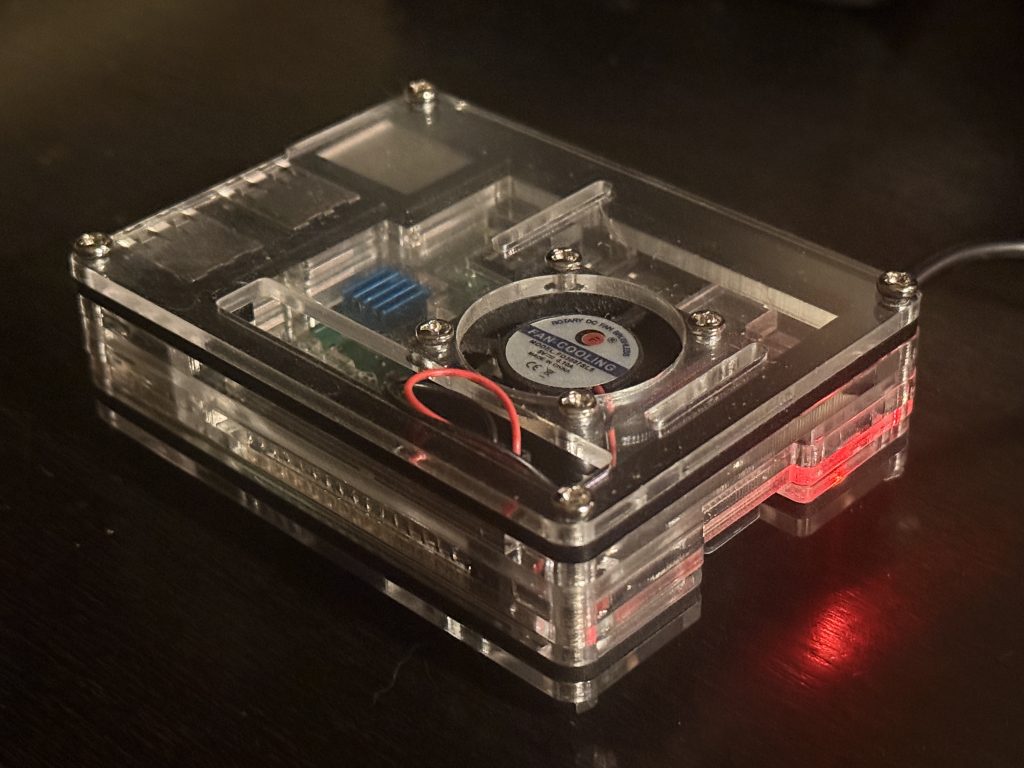
Get a Pi-hole setup (a network-wide ad and telemetry blocker running on a basic cigarette-box-sized computer), VPN configuration for both home and travel needs, and router hardening for your home or office network. If you want, we can even build a router from parts and run open-source software on it; it’s easier than you might think!
// Get Started
Ready to take back your privacy? eric@digitalrivets.net
Privacy FAQs
What does “de-Googling” actually mean, and why would I do it?
It means moving your email, calendar, contacts, photos, and everyday browsing off Google’s services and onto privacy-respecting alternatives — typically Proton Mail with your own domain, a hardened browser like Firefox or Brave, and self-hosted or open-source tools where it makes sense. People do it for different reasons: privacy from advertisers, reducing exposure to data breaches, or just disliking how much one company knows about them.
Can you set up a custom email domain for me or my business?
Yes. I handle domain registration, Proton Mail (or another privacy-focused provider) setup, and full DNS configuration including SPF, DKIM, and DMARC so your mail actually delivers. If you’re an Outlook or Apple Mail person, I can configure those too.
Can you help remove my information from data broker sites?
Yes. I can either set up a paid service like DeleteMe or do the manual opt-out work for the major brokers, depending on your budget and how much follow-up you want. It’s a tricky area — you have to hand your personal data to these companies so they can search for it. Ideally you do the opt-outs yourself; it’s just very tedious.